
payroll
Running payroll
Weekly, fortnightly and monthly pay runs with PAYE, NI and pensions.
Last updated 12/09/2026
Employees first
Open Payroll, choose a client and add employees — name, tax code, NI number, annual salary and pay frequency.
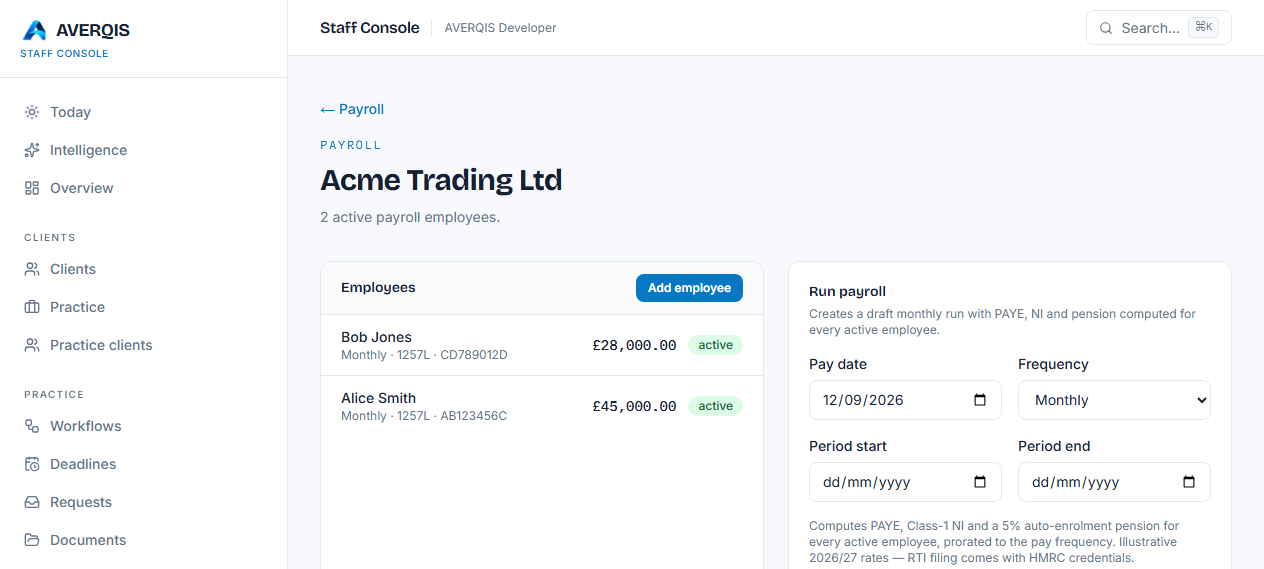
Run a pay period
Choose Weekly, Fortnightly or Monthly, set the pay date and run payroll. Every active employee gets a computed payslip:
- Gross pay
- Income tax (PAYE) using the tax-code allowance and 20%/40% bands
- National Insurance (Class 1)
- Pension (5% auto-enrolment)
- Net pay
Payslips & reports
Use Email payslips to send each employee their payslip, and Email report to send the run summary to the client. If your practice has configured its own SMTP mailbox, emails are sent from it.