
accounting
Reports and dashboards
Profit & Loss, Balance Sheet, Cash flow and aged receivables/payables — read your numbers.
Last updated 12/09/2026
Reports turn your records into a clear financial picture. They are generated live, so the moment you mark an invoice paid or reconcile a line, the reports update.
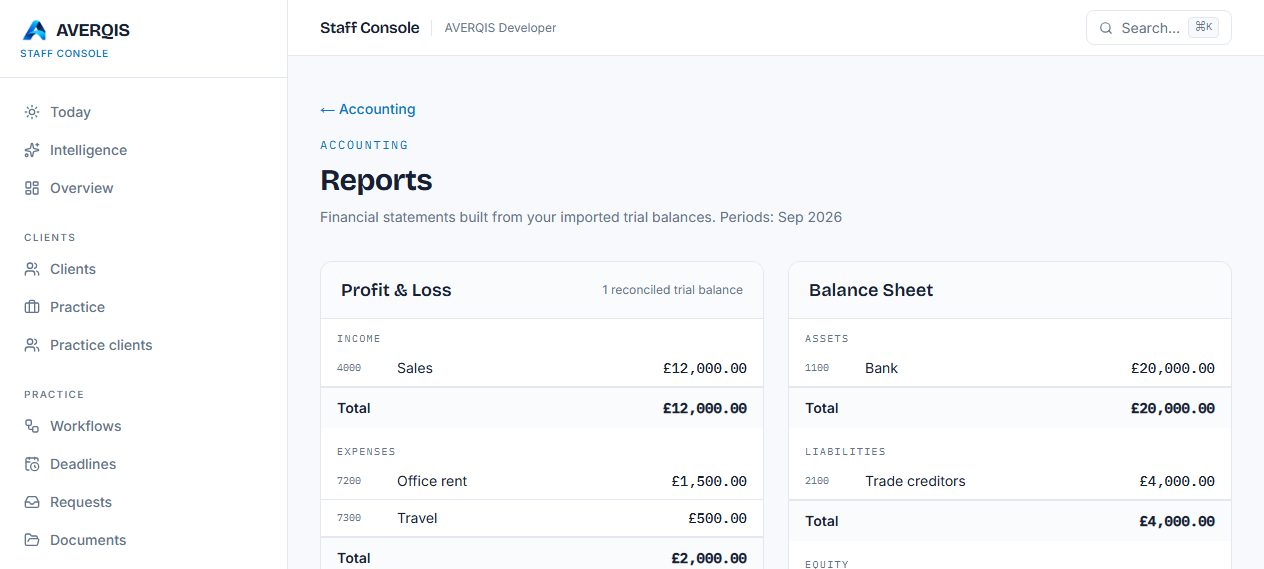
The reports
- Profit & Loss — income less expenses for the period, with a highlighted net profit/(loss) figure.
- Balance Sheet — assets, liabilities and equity, including retained profit for the year. It shows Balanced when assets equal liabilities plus equity.
- Cash flow — opening balance, money in, money out and closing balance straight from your bank account.
- Aged receivables — every unpaid invoice bucketed by how overdue it is (current, 1–30, 31–60, 61–90, 90+).
- Aged payables — every unpaid bill bucketed the same way.
How they link
- The Chart of accounts decides which group each amount falls into.
- Trial balances you import feed the Profit & Loss and Balance Sheet.
- Bank feeds feed the Cash flow.
- Invoices and bills feed the aged reports.
The dashboard
Accounting → Dashboard is your command centre:
- Cash position — money in the bank across accounts.
- Outstanding invoices and bills to pay.
- Net profit from the trial balance.
- Overdue counts and money in/out this month.
- To reconcile — how many bank lines still need matching.
Tips
- Run the aged receivables report to chase overdue invoices.
- Keep the bank reconciled so cash flow is accurate.
- The reports work with one client or many — they reflect the practice's combined data.
Related
- [Accounting overview](/guides/accounting-overview)
- [Year-end](/guides/year-end)